This guide explains how to create an email address in Plesk. Creating an email address in Plesk permits users to establish personalized email accounts associated with their domain, enabling efficient communication with clients and stakeholders.
Follow the steps –
- Log in to Plesk.
- Select the “Mail” option from the left-hand side menu.
- You will enter a new interface, click on the “Create Email Address” button.
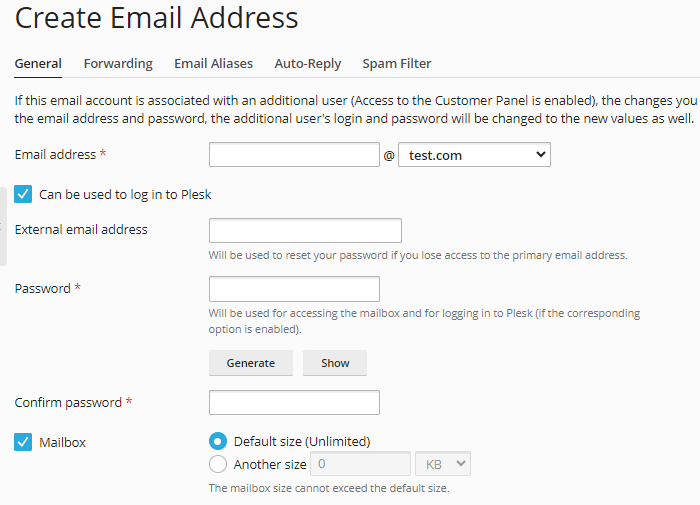
- Fill in the following information-
- Enter the “Email Address”.
- Enter the “External email address” and “Password”.
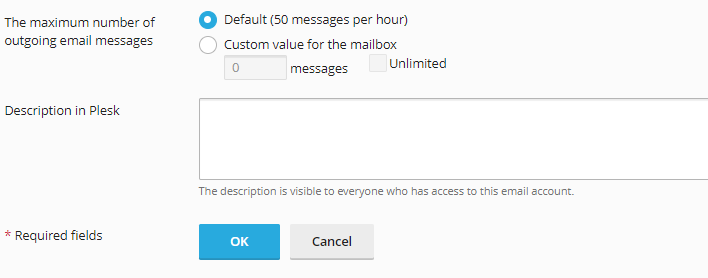
- Enter the maximum number of outgoing email messages.
- Enter the description in Plesk.
- Click on the “Ok” button.
Now, you have successfully created an email address in Plesk. If you want to use your Plesk email with an email client like Outlook, Mac Mail, or the email app on your phone, you need to do configuration settings.
Once you configured your email client in Plesk, you can send and receive emails seamlessly from your desktop or mobile device.