This guide explains how to add a TXT record in cPanel. TXT records are used to store text-based information for services such as SPF (Sender Policy Framework). DNS records can be managed using the Zone Editor in cPanel, which allows you to update records for all domains associated with your account, including primary and addon domains.
Follow the steps:
- You need to log in to your cPanel account.
- In cPanel, go to Domains and click on Zone Editor.

- Click Manage for the domain, select + Add Record (or Add TXT Record), enter the TXT record information, and click Save Record. Editing should only be used for existing TXT records

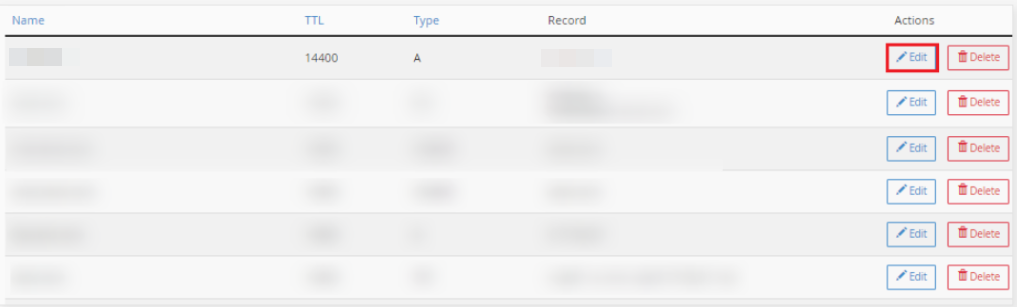
- If you want to edit the existing records then click on edit.
- Select TXT from the Type drop-down menu.
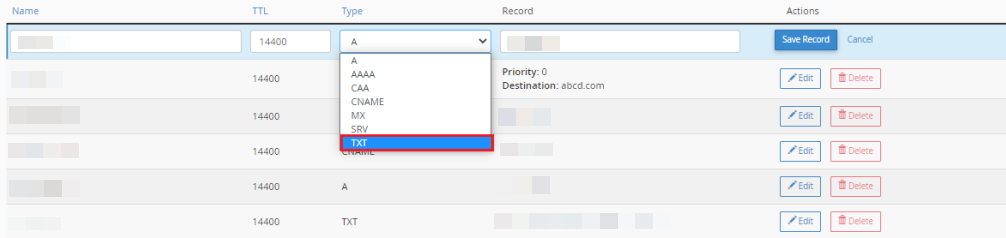
NOTE: Enter the text record’s name in the Name text field.
Enter the text data for the txt record in the Record text area. The TXT record text field does not offer any warnings and accepts any data, including erroneous data.
Click Add Record when you are ready.
We sincerely hope that you now have a clear idea regarding how to add a TXT record in cPanel. However, if you are still facing any difficulty in the procedure mentioned above, feel free to reach out to Webhosting UK for proactive support 24×7.