A server process is a task that is performed on the server. You need to look at the processes currently running on your server to monitor performance and troubleshoot issues. By monitoring these processes, you can see which applications and services are active, how many resources they are using, and identify any that are causing problems.
In WHM , you can easily view and manage these running processes to keep your server running smoothly. This guide will walk you through simple steps to check the processes running on your server. This helps you to stay on top of its performance and ensure everything is running as expected.
Follow the steps:
- Log in to WHM.
- Select the “Process Manager” option under “System health” section.
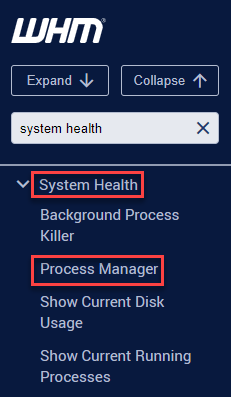
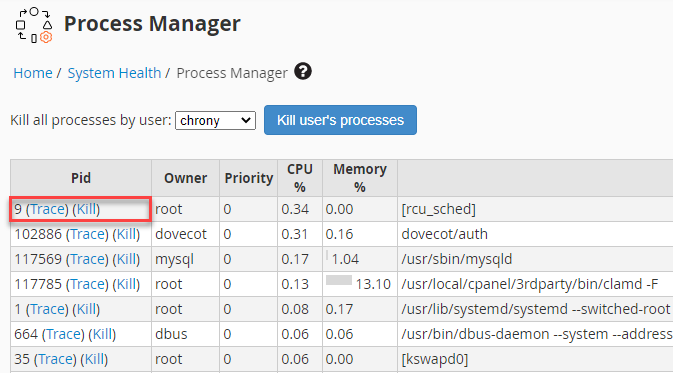
- It will display all the processes running on the server.
- You can “Trace” or “Kill” processes using the options available at the side.
- You can also kill the processes from the particular user using the drop-down menu and then click on the “Kill user’s processes”.
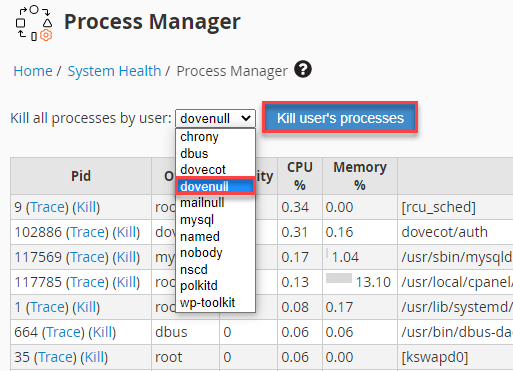
This way, you can view the currently running processes on the server. If you find that, your server is slow or if there is high load then you can kill the process.
To explore more on effectively managing background processes, Read How to use Background Process Killer in WHM.
Hope you like our article.