This article explains how to modify an account’s bandwidth limit using WHM. The amount of information sent to and received by your server is known as its bandwidth.
To modify an account’s bandwidth limit using WHM, please follow these steps:
- Log in to your WHM account.
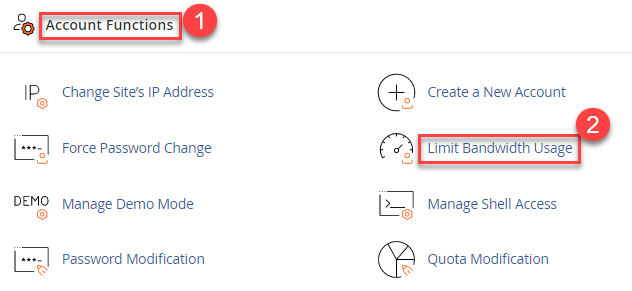
- Once logged in, navigate to the “Account Functions” section.
- Click on the “Limit Bandwidth Usage” option.
- You will see a list of all the cPanel accounts that you have access to. Select the account you want to modify.
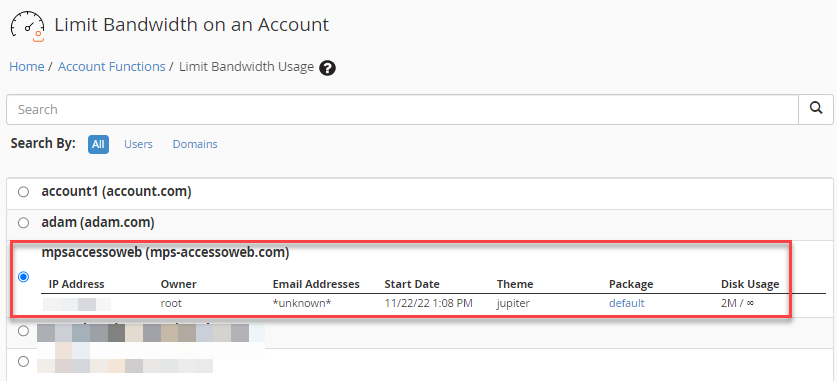
- Click on the “Limit” button next to it.

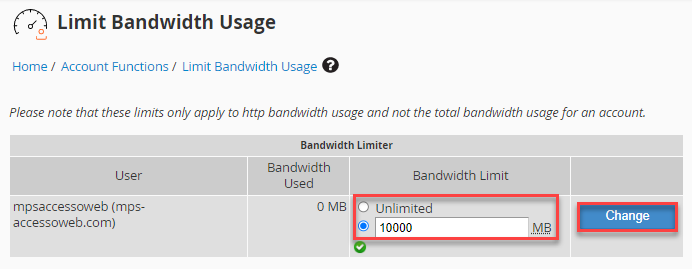
- You will be taken to a page where you can set the new bandwidth limit for the selected account. Either you can set a specific number of megabytes (MB) per month, or you can choose “Unlimited” to remove any bandwidth limits.
- Once you have set the new bandwidth limit, click on the “Change” button to apply the changes.
- You will get a success message.
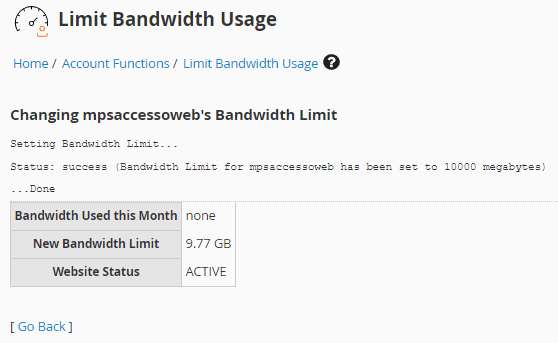
That is it! You have successfully modified the bandwidth limit for the selected cPanel account. Please note that changes bandwidth limit changes are not applied immediately. According to cPanel & WHM, the system checks bandwidth limits once per day between midnight and 6:00 AM. As a result, changes to an account’s bandwidth limit may not take effect until the next scheduled bandwidth check.
Contact our support staff 24×7.