This knowledge base article explains how to enable Shell Fork Bomb Protection in WHM to prevent malicious or accidental fork bomb attacks that can exhaust server resources, cause high load, or lead to server downtime.
Shell Fork Bomb Protection is especially important on servers where users have SSH access, as it helps maintain server stability and protects overall performance.
What Is Shell Fork Bomb Protection?
A fork bomb is a type of denial-of-service attack where a process repeatedly creates new processes, quickly consuming CPU and memory resources.
WHM’s Shell Fork Bomb Protection limits the number of processes a user can create, preventing resource exhaustion and ensuring the server continues to run smoothly.
Steps to Make WHM’s Shell Fork Bomb Protection Operational:
- Log in to WHM.
- Click on the “Security Center” option.
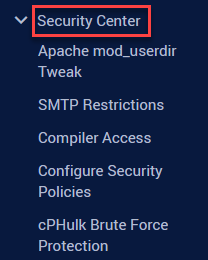
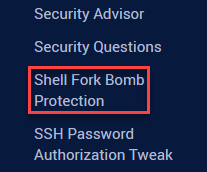
- Click on the “Shell Fork Bomb Protection” option.
- You will see “Status: Enable/ Disable Protection” at the conclusion.
- To make it active, select “Enable.”
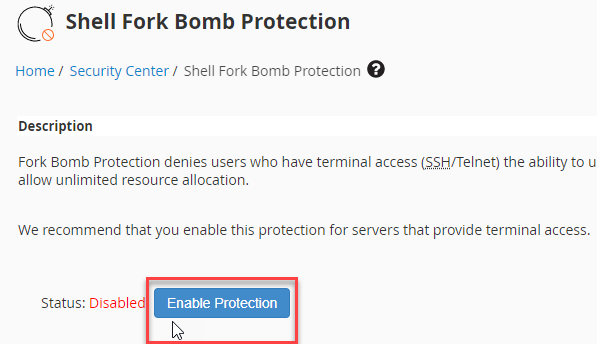
- You will notice that it has been enabled.

You can enable Shell Fork Bomb Protection in this manner using WHM.
After setting up WHM’s Shell Fork Bomb Protection, it’s important to find other ways to protect your website. One method for that is hotlink protection, which stops other websites from linking directly to your files and images and saves your bandwidth. For more information on this, see our guide on how to enable hotlink protection in cPanel. Enabling this can help keep your website safe and running smoothly.