PowerDNS is a versatile and high-performance DNS (Domain Name System) server. It professionally manages domain name resolution, supports different database backends for storing DNS records, and can serve as both an authoritative and recursive DNS server. Its flexibility and robustness make it a prevalent choice for managing DNS infrastructure.
PowerDNS operates in two primary roles:
- Authoritative Server: Handles queries only for domains it directly manages, offering authoritative answers.
- Recursor: Does not store domain data but fetches answers from authoritative servers for client queries it receives.
Installing PowerDNS via WHM:
- Log in to WHM.
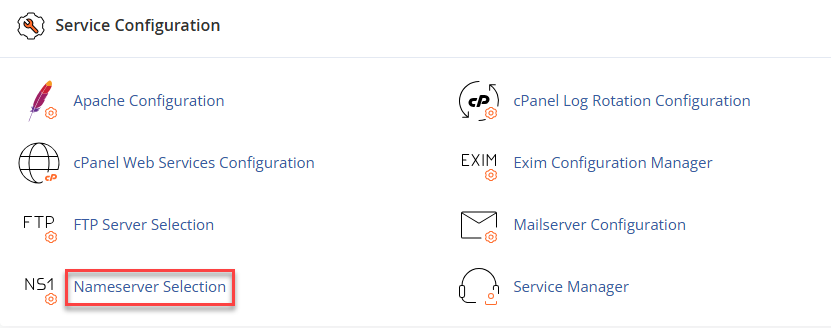
- Select the Service Configuration option from the left-hand side menu.
- Click Nameserver Selection.
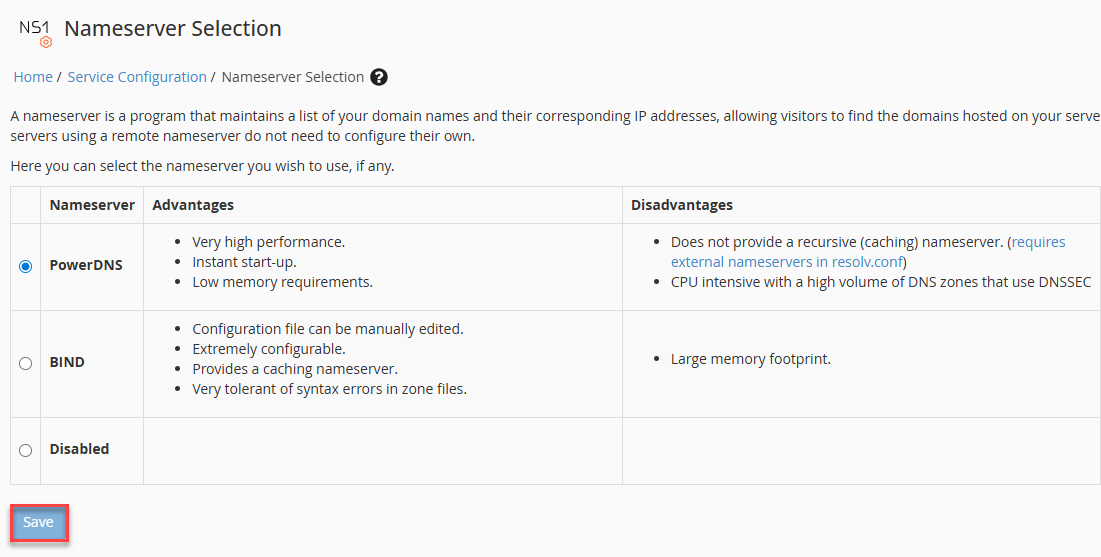
- Select PowerDNS.
- Click the Save button.
Installing PowerDNS on CentOS:
- Ensure MySQL/MariaDB is running properly
systemctl start mariadb
systemctl enable mariadb
- Install EPEL repository
dnf install epel-release -y
- Install PowerDNS and required packages
dnf install pdns pdns-backend-mysql bind-utils -y
- Start and enable the PowerDNS service
systemctl start pdns
systemctl enable pdns
- Edit the PowerDNS configuration file (if needed)
vi /etc/pdns/pdns.conf
- Check if PowerDNS is functioning
dig @127.0.0.1# ordig @localhost
Wasn’t that simple? If you still have any questions or need assistance, feel free to contact our support team.