In this article, we will explain how to manage PostgreSQL databases. If you are looking to manage your PostgreSQL database users, then visit this article.
Once you have created a database user, now that you are prepared, create a database and link the user to it:
Steps to Create a Database:
- Log in to your “cPanel Account”.
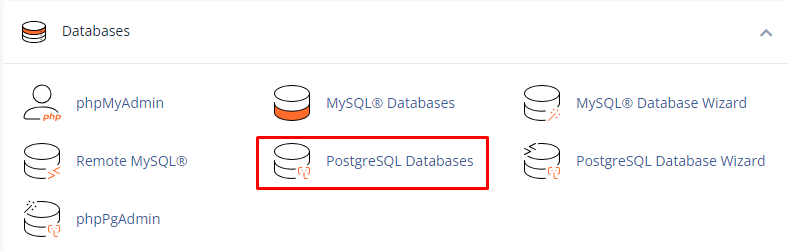
- Search for the “Databases” section, and click on the “PostgreSQL Databases”.
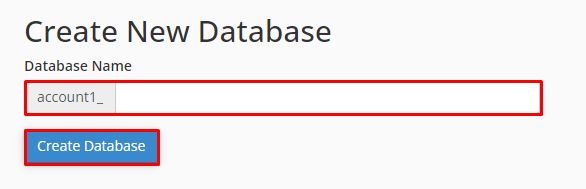
- Under “Create New Database”, type the name of the database, and click on “Create Database”.
Add a user to a database
- Log in to your “cPanel Account”.
- Click on the “PostgreSQL Databases” from the Search tool.
- Under “Add User to Database”, select the “user” and the “database” that you want to add.
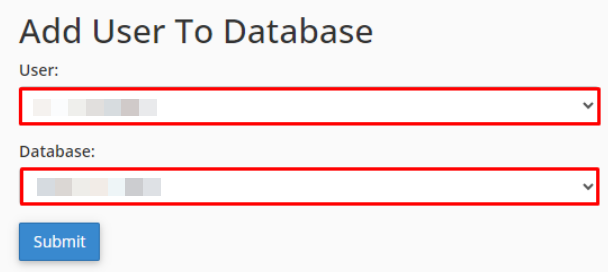
- Click on “Submit”.
Remove a user from a database
- Log in to “cPanel”.
- Click on the “PostgreSQL Databases”.
- Under “Current Database”, select the user that you want to remove and click the “Delete icon”.

Delete a “Database”.
Remember: – Before deleting a database, make sure that you have a backup copy.
- Log in to your “cPanel Account”.
- Selectthe “PostgreSQL Databases” tool.
- Under Current Databases, select the database that you want to delete, and then click “Delete”.

In this manner, you can manage your PostgreSQL Databases. For more information on the database, visit our knowledge base section.