Logging into WordPress by Softaculous is a simple process that helps streamline your website management tasks. With the close integration of Softaculous with cPanel, your users have access to 381 apps. The full lifespan of the application, including installation, backup, and update, is handled by Softaculous.
This guide will walk you through the steps to log into your WordPress site with Softaculous. you can efficiently manage your content and settings with minimal hassle.
Follow the steps to log in to WordPress with Softaculous:
- Log in to cPanel.
- Navigate to “Softaculous Apps Installer” and click on the “WordPress” script.
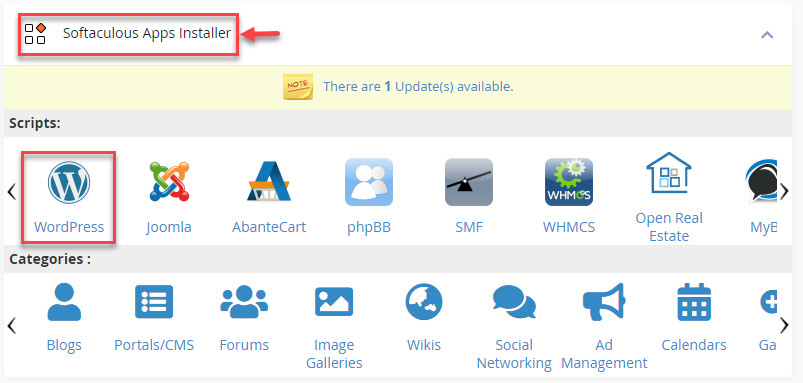
- Click on the “All Installations” icon.

- You typically need to log in as an Administrator to operate with a CMS.
- To continue, click the Admin icon.
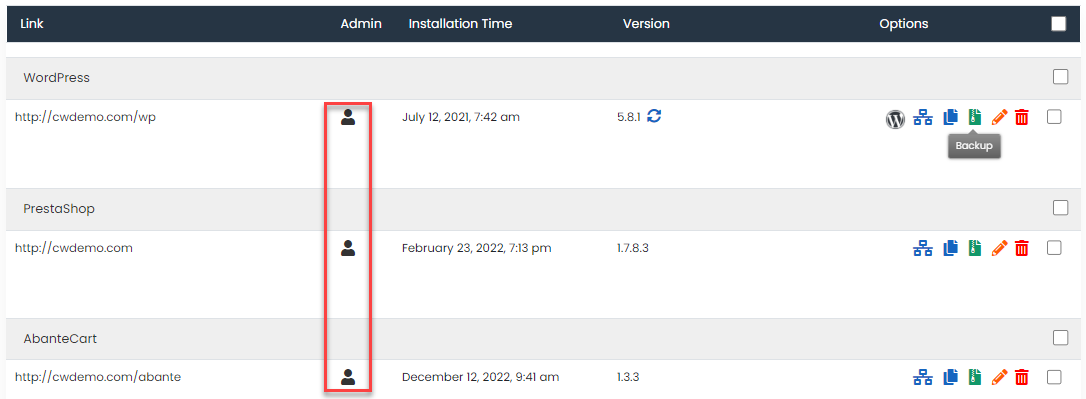
This way, you can log in to WordPress with Softaculous.
Understand the importance of backing up your site and how to do it with Softaculous in How to Create Backup of Any Application using Softaculous in cPanel.
For more information, do visit our KB section regularly. Hope you grasped this article very well.