This tutorial explains how to import previously exported Outlook PST files into Microsoft Outlook 2021, 2019, 2016, and 2013.
Let us follow the steps:
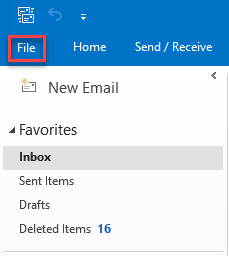
- Open Outlook and select the “Files” tab.
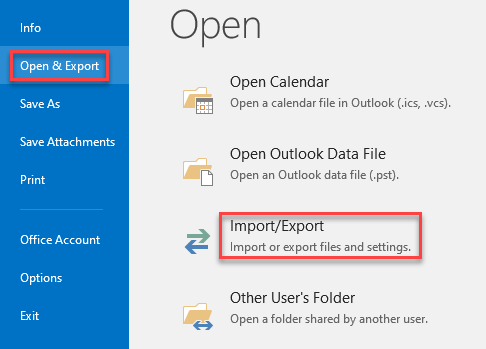
- Select the “Open and Export” option from the left-hand side menu to launch the “Import/Export” wizard.
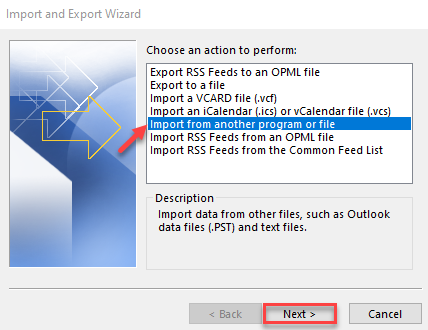
- Select “Import from another program or file” from the actions available and click on the “Next” button.
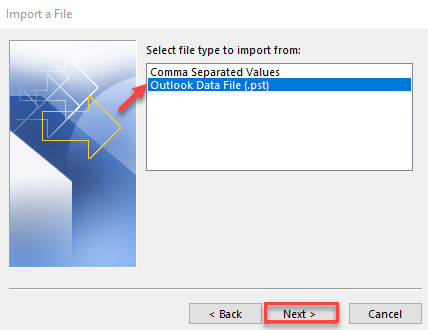
- Now, in the next dialogue box, select the file type as “Outlook Data File (.pst)” and click on the “Next” button.
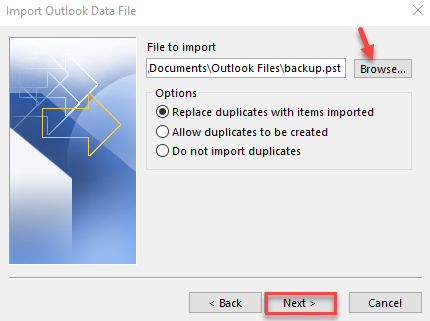
- Next, navigate to the file on your computer and insert it into the appropriate location.
- Once completed, click the “Finish” button.
That’s it! You can now access all your imported Outlook emails in the Outlook application with the original formatting intact.